# Change the card associated with a subscription
First, ensure the card you want to associate with your subscription [has been added](https://learninghub.primer-e.com/link/1129) to your account in the [customer portal](https://subscriptions.primer-e.com/portal/primere). Then, to change the card associated with a paticular subscription, follow the steps below.
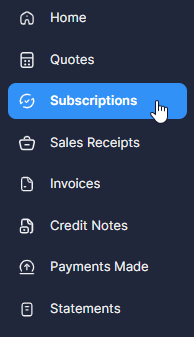
1. Click on '**Subscriptions**' (listed in the left-hand panel in the [customer portal](https://subscriptions.primer-e.com/portal/primere)).
[](https://learninghub.primer-e.com/uploads/images/gallery/2026-02/21-subscriptions-menu-item.png)
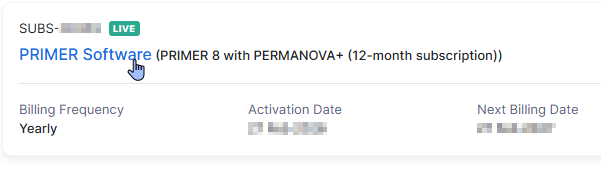
2. Click on the name (in blue) of the specific subscription item ('**PRIMER Software**') for which you wish to change the card.
[](https://learninghub.primer-e.com/uploads/images/gallery/2026-02/51-choose-subscription-blue.png)
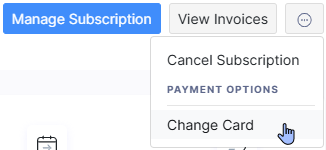
3. Click the 3 dots at the top right-hand side of the page, then click '**Change Card**'.
[](https://learninghub.primer-e.com/uploads/images/gallery/2026-02/37-change-card.png)
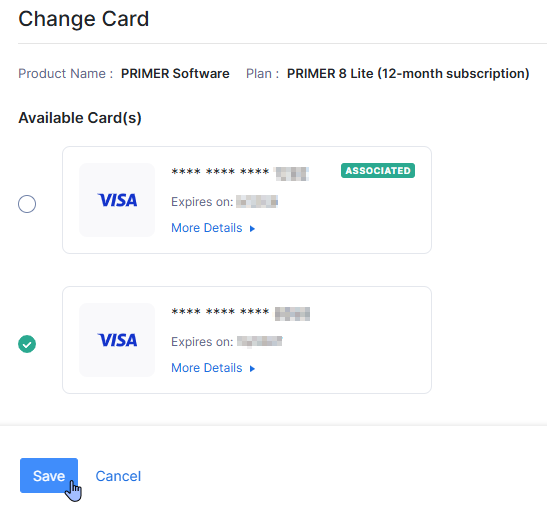
4. Put a tick next to the card you want to associate with this particular subscription for renewal payments, then click '**Save**'.
[](https://learninghub.primer-e.com/uploads/images/gallery/2026-02/41-choose-different-card-for-payment.png)
Once you have associated a card with a subscription, the word 'Associated' (in green) will appear next to that card's details to indicate this:
[](https://learninghub.primer-e.com/uploads/images/gallery/2026-02/42-associated.png).