# Indicators in selection
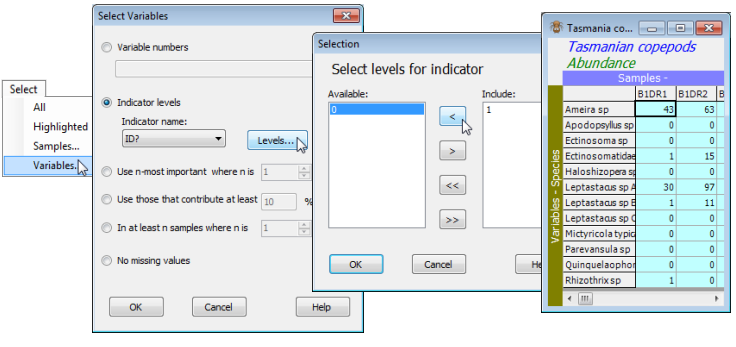
Selection by indicator levels is demonstrated by **Select>Variables**>(•Indicator levels)>(Indicator name: ID?)>**Levels**>(Include: 1) & (Available: 0), giving a subset of the Tasmania copepods data sheet which drops the undetermined species. Of course, for such a small data set there are simpler ways of dropping these last five species – see the range of selection options in Section [3](https://learninghub.primer-e.com/books/primer-v7-user-manual-tutorial-CN7/chapter/3-highlighting-and-selection-select).
[](https://learninghub.primer-e.com/uploads/images/gallery/2024-05/screenshotpage43b.png)
Now reverse the selection by **Select>All** (and **Edit>Clear Highlight** if you wish), and resave the Tasmania ws.pwk workspace, using **File>Save Workspace**, for use in later sections.
One apparently obvious application for indicators is to specify which species belong to which higher-order taxonomic groups. If separate multivariate analyses are required by major phyletic group, for example, then the different phyla should be set up as an indicator on the species, since this will allow easy selection of the species in a single phylum from the samples $\times$ species sheet.