
Cancel your subscription
You can cancel your subscription through the customer portal, or by contacting us directly via email at primer@primer-e.com. You will still have access to the software until the end of the current subscription period. Your subscription will not be renewed, but instead will be cancelled at the end of your current subscription period in accordance with your request.
To cancel your subscription, first sign in to the customer portal, then follow these steps:
- Click on 'Subscriptions' (listed in the left-hand panel).
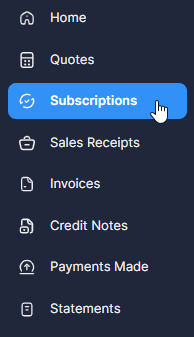
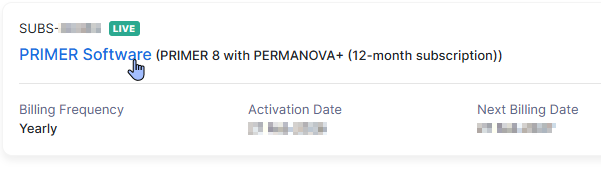
You will see a list of all your current ('live') subscriptions.
- Click on the name of the specific subscription item you wish to cancel ('PRIMER Software').
- On the next screen, just to the right of the button with the words 'View Invoices', you will see a button with three dots surrounded by a circle:
 .
.

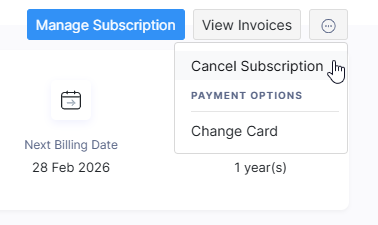
- Next, click the button 'Cancel at End-of-term', as shown below:
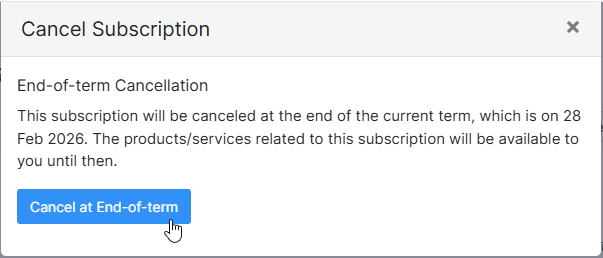
Note that you will still have access to the software until the end of the current subscription period. The subscription will only be cancelled at the end of the subscription term.
- Finally, please provide a reason for your cancellation and click 'Proceed', e.g.,
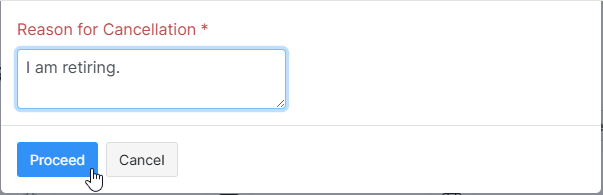
You will see a confirmation ('Your subscription has been cancelled.'). The status of your cancelled subscription will now show in the portal as 'non-renewing' ( ), instead of 'live' (
 ).
).
If you change your mind
If you change your mind and would like to turn your subscription back on (so that it renews at the end of the current subscription period), just get in touch with us directly at primer@primer-e.com.