
Manage your subscription
You can manage your subscription directly from within the client portal. More specifically, you can:
- Change your subscription plan;
- Change the number of seats;
- Renew your subscription check; or
- Cancel your subscription.
You can also change your card payment details, if necessary.
If you run into any issues with managing your subscription through the portal, if your desired change to a new licencing solution cannot be achieved via the portal (e.g., you'd like a floating licence), or if you need any other kind of special assistance, just get get in touch with our admin team directly at primer@primer-e.com and we will be happy to help.
Change your subscription plan
You can change your subscription plan by signing in to PRIMER-e's client portal and following the instructions below.
To upgrade from PRIMER 8 Lite $\rightarrow$ PRIMER 8 with PERMANOVA+
- Click on 'Subscriptions' (listed in the left-hand panel):
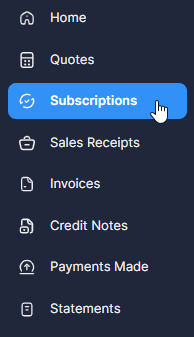
You will see a list of all your current subscriptions.
- Click on the name of the specific subscription item you wish to change.
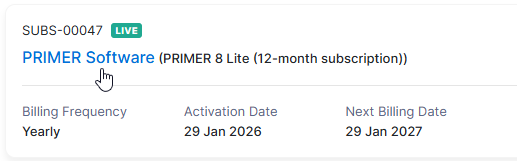
then click the blue 'Manage Subscription' button:

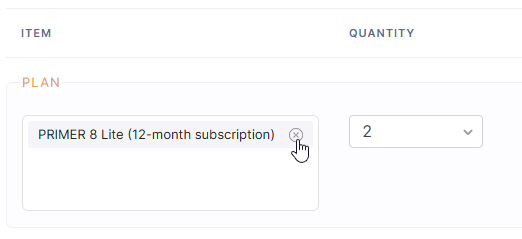
- Click on the small 'x' symbol next to the name of your current plan:
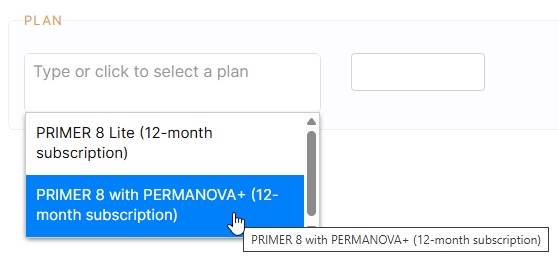
- Click on the plan you want; i.e., 'PRIMER 8 with PERMANOVA+':
- Check the details associated with this change, including the additional payment required to add PERMANOVA+ features. Note that:
- To apply your changes you will have to pay for the differential amount. You will be directed to a secure payment page after clicking Continue.
- Auto-charge will be enabled for this subscription if you use a payment method that supports recurring payments (i.e., debit or credit card).
If all the details showing are correct, make sure to include your coupon code (if any), then click 'Continue' at the bottom of the screen.

- A 'Subscription Preview' will be shown to you, including details of all immediate and recurring subscription charges. Click 'Update Subscription' to confirm payment and to make the change.

Upon successful completion of the above steps, you will receive an email confirming the change to your subscription plan. The change will take place immediately upon payment, and your Licence Key will reflect this change in your entitlements right away.
Important: Your current Licence Key remains the same, but you will need to re-authenticate the software for this change to take effect. Please be sure to follow the instructions in the email in order to activate PERMANOVA+ in your PRIMER Software.
To change from PRIMER 8 with PERMANOVA+ $\rightarrow$ PRIMER 8 Lite
You can follow the same steps as outlined above to click on 'Manage Subscription' and then change your plan from PRIMER 8 with PERMANOVA+ down to PRIMER 8 Lite. If you make this type of change in the client portal, you will receive an email confirming that your request has been documented and that this change will be implemented upon renewal of your subscription. Your invoice/payment due at that time will reflect this change. Note that:
- Your current Licence Key remains the same and will not reflect the change until renewal.
- You will still have access to all the entitlements and features in PERMANOVA+, in accordance with your current plan, until the end of your current subscription period.
Change the number of seats
You can change the number of seats associated with your subscription. To change the number of seats:
- Sign in to PRIMER-e's Client portal.
- Click on 'Subscriptions' (listed in the left-hand panel).
- Click on the name (in blue) of the specific subscription item you wish to change ('PRIMER Software').
- Click the button that says 'Manage Subscription'.
- Under 'Quantity' change the number of seats to the desired number. For example, to change the number of seats from 3 to 4, it would look like this:
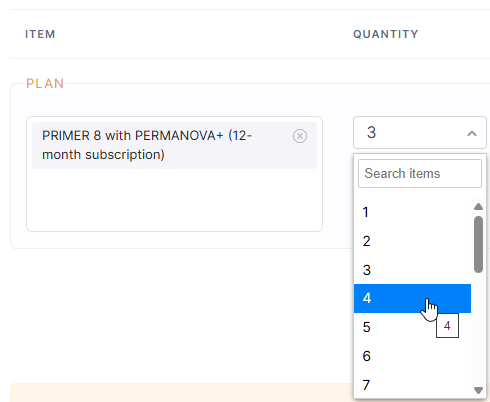
- Check that all the details shown are correct and click 'Continue', then click 'Update Subscription'.
Note the following:
If you increase the number of seats, then:
- To apply your changes you will have to pay for the differential. You will be directed to a secure payment page after clicking Continue.
- Auto-charge will be enabled for this subscription if you use a payment method that supports recurring payments (i.e., debit or credit card).
- Upon successful completion of the above steps, you will receive an email confirming the change. The change will take place immediately upon payment.
- Your Licence Key will remain the same, but post-payment it will reflect this change in your entitlements right away, permitting you to install and activate your software on more devices, in accordance with the number of seats you have chosen to purchase for your subscription.
If you decrease the number of seats, then:
- Your request to change the number of seats for your PRIMER Software subscription will be applied upon renewal.
- Your invoice/payment due at that time will reflect this change.
- Your current Licence Key remains the same. You will still have access to all the benefits of the full number of seats associated with your current plan until the end of your current subscription period.
Renew your subscription
You will receive:
- an initial renewal reminder by email 30 days check prior to the end of your Subscription Period.
- a second renewal reminder by email 5 days prior check to the end of your Subscription Period.
If you have paid for your subscription via credit or debit card, then payment for the renewal of your subscription will be made automatically using those payment details (our system retains this information). If your card has expired, then please sign in to the client portal to update your card details. Please view our Privacy Policy for details regarding our use of any information you provide to us.
If you have paid for your subscription using some other method (e.g., via direct bank transfer, through an invoice or purchase-order process), then you will be sent an invoice for payment 30 days prior to the end of your subscription period. check Your subscription will be renewed upon payment of our invoice.
Provided payment is made prior to the end of your current subscription period, then your subscription plan will be renewed. Your Licence Key will remain the same and there will be no need to re-install or re-authenticate the software upon renewal. Please refer to our EULA for further details.