
15.2 New selection options
In PRIMER 8, the options available for selecting samples or selecting variables have been expanded considerably from what they were in PRIMER 7.
Selecting Samples
When you click Select > Samples... in P8, you will see the new dialog shown at right in Fig. 15.2.
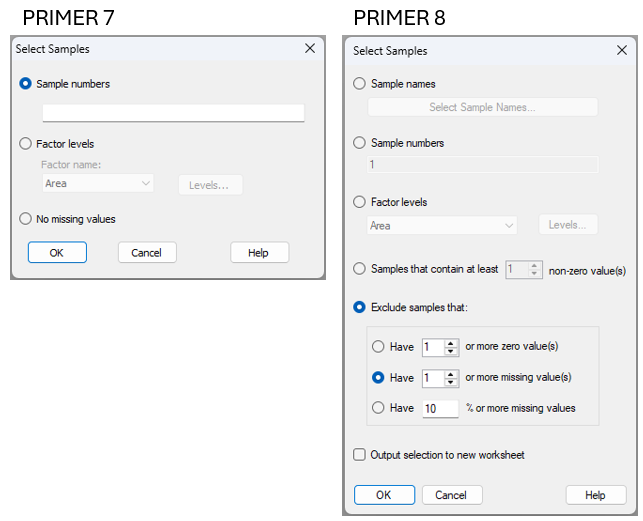
Fig. 15.2 Comparison of the Select > Samples... dialog window in PRIMER 7 (at left) vs PRIMER 8 (at right).
Note that in PRIMER 8, you can select samples:
- using sample names (this option includes a filter to help find names in long lists);
- using sample numbers;
- belonging to certain level(s) of a factor; or
- that contain some minimum number ($x$) of non-zero values.
You can also exclude samples that:
- have ($x$) or more zero values;
- have ($x$) or more missing values; or
- have ($x$)% or more missing values.
Note also that there is the option to: '$\checkmark$Output selection to new worksheet'.
This latter option means you don't have to take any extra steps (post-selection) simply to duplicate the selected data into a new worksheet (if desired) for subsequent analyses. As an added bonus, a small output file is produced when you tick this option which identifies precisely what choices you made to select the samples. It is very useful to have this information going forward, to keep track of any subset selections made along your analysis pathway.
Selecting Variables
When you click Select > Variables... in P8, you will see the new dialog shown at right in Fig. 15.3.
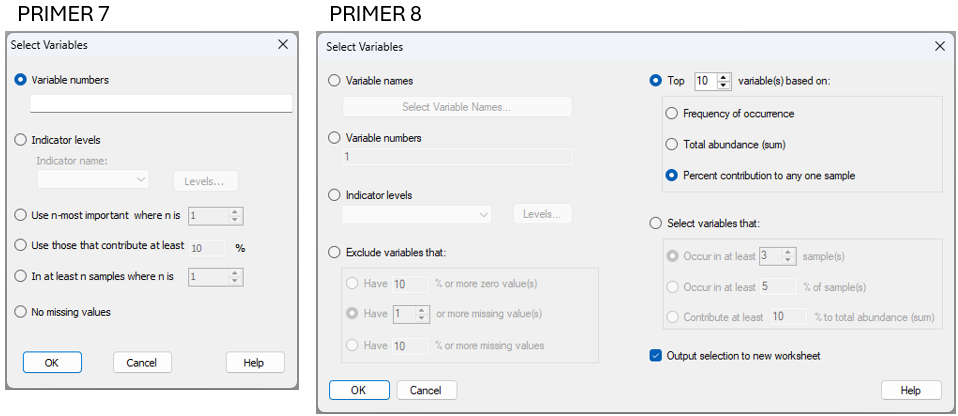
Fig. 15.3 Comparison of the Select > Variables... dialog window in PRIMER 7 (at left) vs PRIMER 8 (at right).
Note that in PRIMER 8, you can select variables:
- using variable names (this option includes a filter to help find names in long lists);
- using variable numbers; or
- belonging to certain group(s) of an indicator.
It is also possible to select variables that correspond to the top ($x$) variables in a list based on:
- frequency of occurrence;
- total abundance (sum); or
- percent contribution to any one sample (this option was called 'most important' in PRIMER 7)
Finally, you may choose to select variables that:
- occur in at least ($x$) sample(s);
- occur in at least ($x$)% of sample(s); or
- contribute at least ($x$)% to the total abundance (sum).
Note that the above dialog gives you a lot of freedom with respect to identification of 'important' variables in ecological contexts, not just on the basis of total abundance (in any one sample or overall), but alternatively by reference to their frequency of occurrence. Using the frequency of occurrence may often be more suitable, as a criterion, than pulling out species based on their total abundance values, particularly if there are highly sporadic species that have massive abundance values (e.g., weeds or opportunists), but that may not actually be that important ecologically (e.g., they might have shown up in just a single sample).
As an added bonus (and precisely as we saw in the dialog for the selection of samples, shown above), you can choose to: '$\checkmark$Output selection to new worksheet'. This streamlines and clarifies analytical pathways.
Filters (New!)
For either the selection of samples or the selection of variables by name, PRIMER 8 offers a new tool in the form of a filter that is very helpful whenever you are dealing with long lists of names in large data sheets. For example, suppose I wish to select all of the variables from a long list of species that belong to the same genus (e.g., Ampelisca), I simply choose to select variables by names and click the 'Select Variable Names...' button ( ), then start typing the genus name into the 'Filter:' box, and those species will appear in the 'Available:' list for me to easily select them (see Fig. 15.4 below).
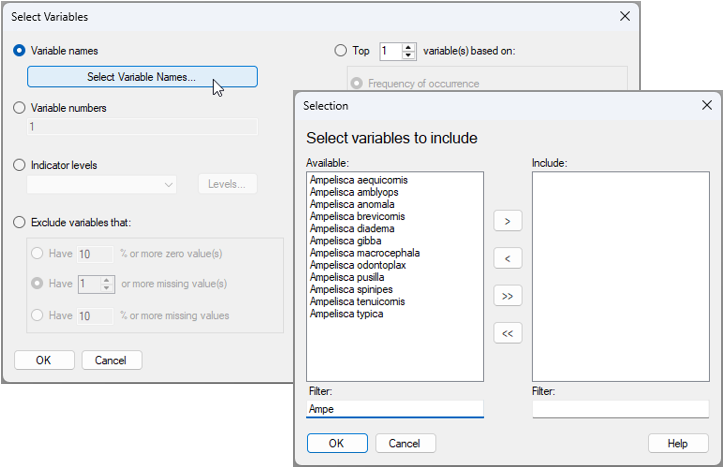
Fig. 15.4 Dialog window for selecting names of variables, using the new 'Filter:' tool in PRIMER 8. In the above example (data in the file named 'Norway_macrofauna.pri', found inside the 'Examples_P8 > Norway_macrofauna' folder), there are 809 taxa in the data sheet, but by typing the letters 'Ampe' in the 'Filter:' box, the available list is reduced to just the 12 variables that have this particular combination of letters in their name. All of these are of the genus 'Ampelisca'.
Using this new filtering tool in PRIMER 8 means you can quickly and easily find and select specific variables (or samples) that you know are in your data somewhere (e.g., all variables starting wtih the letter "R"), even if you cannot easily remember the entire name in detail.