
2.2 Example: Empirical distributions of oyster sizes
To demonstrate the empirical distribution tool in PRIMER, we shall examine a dataset consisting of length measurements (in mm) of the Sydney rock oyster (Saccostrea commercialis) settling on various surfaces in Quibray Bay, New South Wales, Australia ( Anderson (1992) , Anderson & Underwood (1994) ). Settlement panels (measuring 10 cm x 10 cm) of four different substrata commonly introduced by humans into marine environments (concrete, marine plywood, fibreglass and aluminium) were placed in intertidal estuarine habitats (an oyster farm) in the bay. The greatest length (the longest distance from the umbo to the tip of the furthest growing edge) of all oysters settling on these four different types of surfaces were recorded after a period of 4 months (January - May, 1992).
A subset of the data (i.e., from just one of the sticks deployed in field, see Anderson & Underwood (1994) for logistic details of the experiment) are contained in a file called 'Quibray_oyster_sizes_subset.pri' (found in the 'Quibray_oysters' folder in 'Examples_P8'). In this file, the lengths of oysters from the four different substrata are provided as 4 different levels of a factor called 'Substratum'. Note that there were different numbers of oysters on each of these different types of surfaces (hence, different sample sizes for different levels of the factor), but this is not of any concern here. We are comparing only the shape of the distribution of sizes of oysters that have settled among these four different types of surfaces; we are not comparing the total number of individuals that have settled on them.
- Start running PRIMER 8, then click File > Open... and open the data file named 'Quibray_oyster_sizes_subset.pri' (in 'Examples_P8 > Quibray_oysters').
![02.Oyster_data_subset_for_cdf[i].png](https://learninghub.primer-e.com/uploads/images/gallery/2025-12/02-oyster-data-subset-for-cdf-i.png)
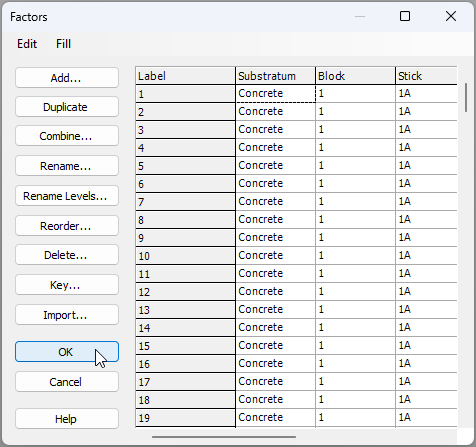
- It would be useful to see the empirical distributions for the four different surfaces side by side on a single plot. From the data sheet, click Edit > Factors.. and you can see the factor of 'Substratum' that shows the type of surface on which each individual measured oyster had settled.
- Now we are ready to create the plot. From the data sheet, click Plots > Empirical Distribution Plot....
![04a.Empirical_distribution_menu_item[i].png](https://learninghub.primer-e.com/uploads/images/gallery/2025-12/04a-empirical-distribution-menu-item-i.png)
In the resulting dialog box, choose to draw the lines for '$\bullet$ Variables' (there is only one variable here, so just one plot will be given in the output) and choose to 'Split into multiple distributions (lines) > $\checkmark$Factor > Substratum. Also, tick the box that says '$\checkmark$Express as proportions: [0, 1]'. The resulting dialog will look like this:
![04.Empirical_distribution_plot_dialog[i].png](https://learninghub.primer-e.com/uploads/images/gallery/2025-12/04-empirical-distribution-plot-dialog-i.png)
The resulting graphic (called 'Graph1' in the Explorer tree) will look like this:
![04.Sizes of Saccostrea commercialis_graphic[i].png](https://learninghub.primer-e.com/uploads/images/gallery/2025-12/04-sizes-of-saccostrea-commercialis-graphic-i.png)
From this graphic, we can see that there were, proportionately, quite a lot more large oysters measured on concrete surfaces (dark blue line) compared to the other substrata. In addition, fibreglass surfaces (green line) had proportionately fewer smaller-sized oysters than the other substrata. We can also consider looking at these distributions using dot plots, violin plots, or histograms. It is also possible to formally test the null hypothesis of 'no difference' in the underlying distributions for any pair of these groups, using the Kolmogorov-Smirnov test.